
Billing & Payment Instructions
Easily recharge your monthly SpaceX Online internet bill via Self Care, bKash Pay Bill, bKash Payment, or Nagad.
Accepted Payment Methods
Pay from your mobile wallet anytime, anywhere in Bangladesh.
Customer Self-Care Portal
Existing subscribers can check real-time bandwidth consumption, view invoice history, and renew connection instantly.
2. bKash Pay Bill
Pay directly from bKash App using the "Pay Bill" feature under Internet / SpaceX Online.
bKash Payment
Pay Bill & Merchant payment accepted.
Nagad Payment
Merchant Payment & App pay.
Step-by-Step Payment Instructions
Follow these visual guides to complete your monthly SpaceX Online broadband recharge.
1. Self Care Portal (Instant Auto-Recharge)
The fastest automated way to pay using Cards, bKash, Nagad, Rocket, or Internet Banking.
Access Self-Care
Go to selfcare.spacexraj.com and enter your Customer ID & Password.
Check Due & Invoice
Navigate to the Billing tab to check current active cycle and due balance.
Pay Online Gateway
Click "Pay Online" and select your preferred method (bKash, Nagad, Visa, Mastercard).
Instant Reconnection
Line is automatically refreshed within 60 seconds of successful gateway callback.
 Subscriber Portal

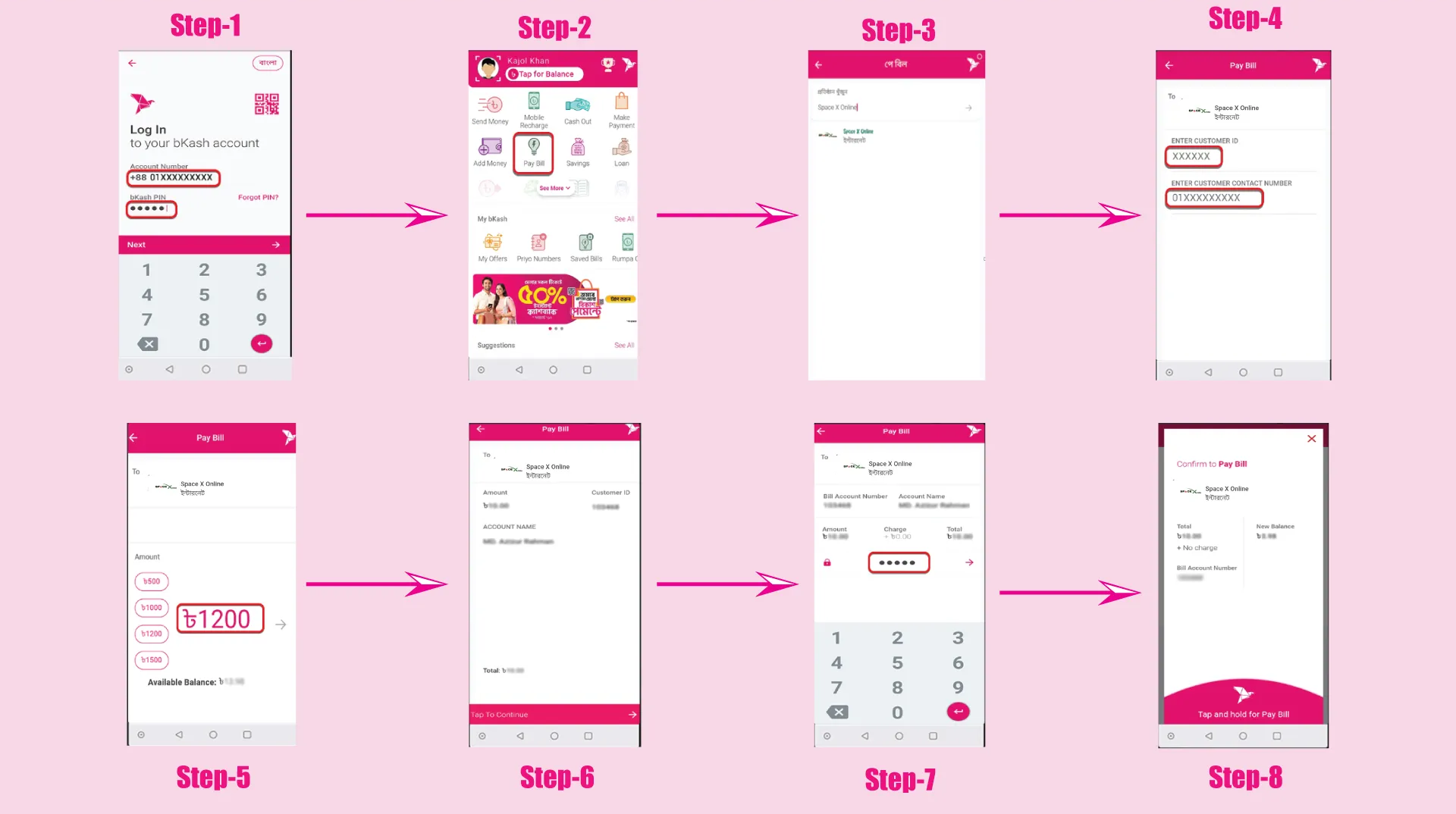
2. bKash Pay Bill Instruction
Pay directly from bKash App using the "Pay Bill" feature under Internet / SpaceX Online.
- 1 Open the bKash App and select "Pay Bill" from the main menu.
- 2 Search for "SpaceX Online" or choose Internet service.
- 3 Enter your SpaceX Online Customer ID / User ID.
- 4 Enter your Contact Mobile Number for SMS receipt.
- 5 Verify bill amount, enter your bKash PIN, and tap & hold to complete Pay Bill.
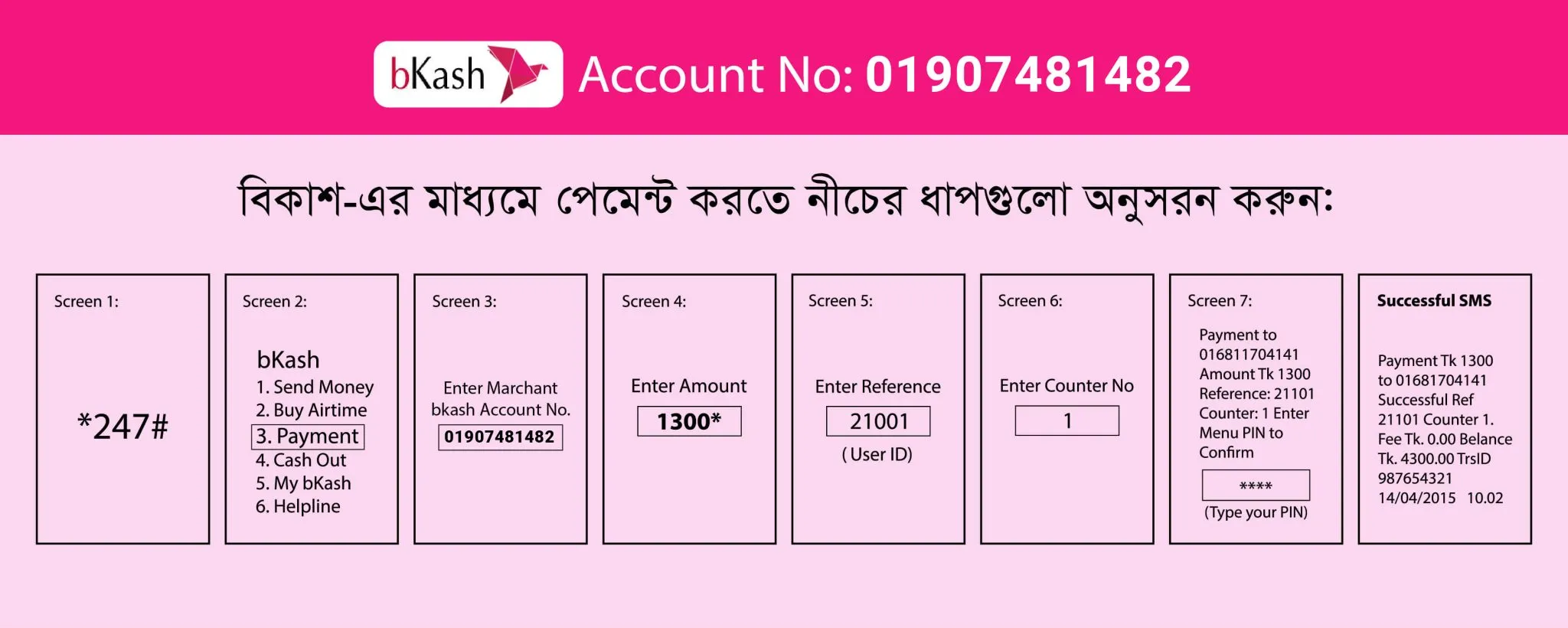
3. bKash Payment (Merchant / USSD)
Make payment via bKash App or dial *247# using our verified Merchant Account.
- 1 Dial *247# or open bKash App and tap "Payment".
- 2 Enter Merchant bKash Account Number: 01907481482.
- 3 Enter your exact monthly package bill amount.
- 4 Enter Reference: Your Customer ID / Username.
- 5 Enter Counter Number: 1.
- 6 Enter your bKash PIN to confirm transaction. Keep the TrxID SMS.
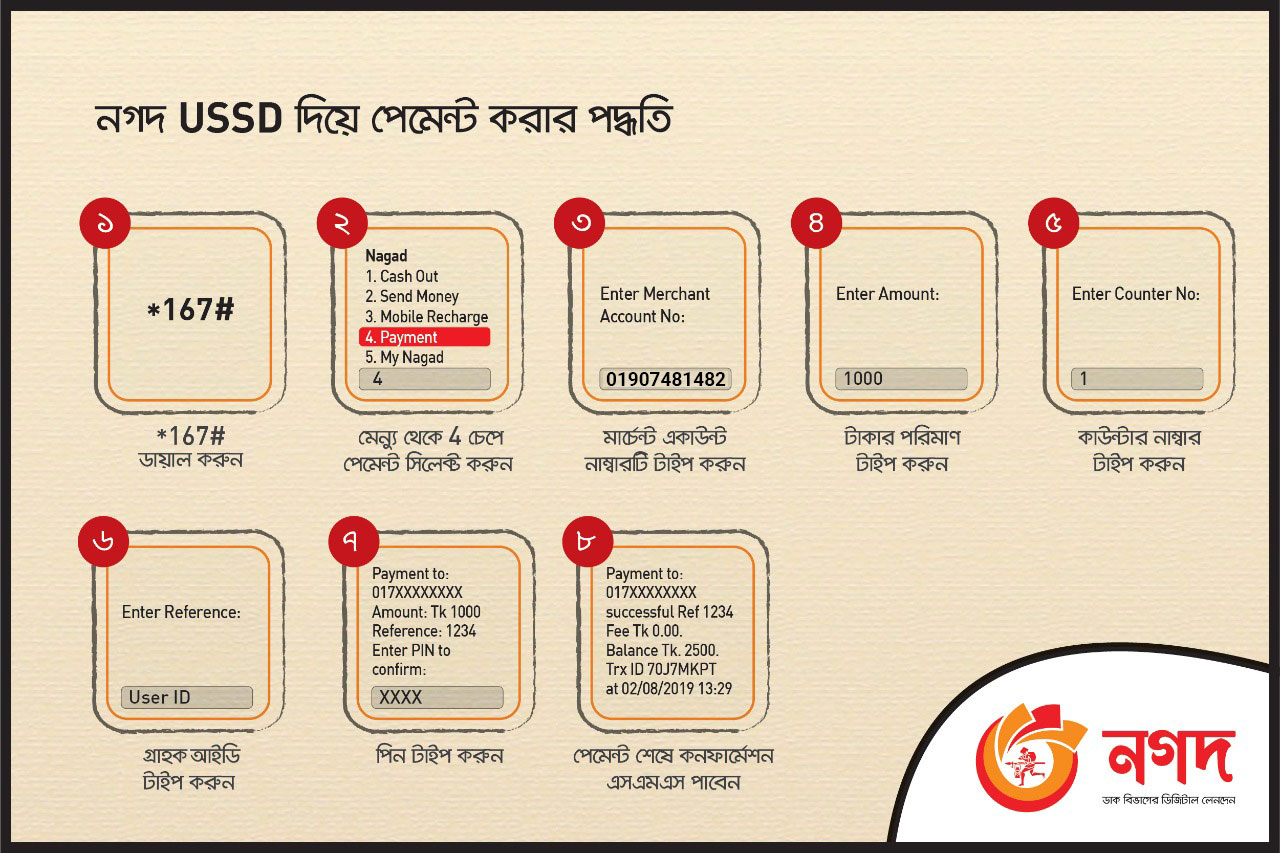
4. Nagad Payment (Merchant / USSD)
Pay via Nagad App or dial *167# directly to our Merchant Account.
- 1 Dial *167# or open Nagad App and select "Payment" (Option 4).
- 2 Enter Merchant Account Number: 01907481482.
- 3 Enter your monthly subscription fee amount.
- 4 Enter Reference: Your Customer ID / Connection ID.
- 5 Enter Counter Number: 1.
- 6 Enter your Nagad PIN to confirm. Save confirmation SMS with TrxID.
Important Billing Policies
Monthly Billing Cycle
Internet broadband accounts run on a monthly prepaid cycle. Invoices are generated at the beginning of each billing month.
Grace Period
A standard grace period is provided. Please recharge before your grace window expires to avoid automated line suspension.
Automated Reconnection
Once your payment transaction ID and Customer ID match, your fiber line automatically resumes within minutes.
SMS & Invoice Receipt
An automated SMS confirmation is delivered to your registered mobile number upon payment receipt.
Need Help With Your Bill?
If you paid with an incorrect Customer ID or have not received confirmation within 15 minutes, please call our helpline.
Got Questions About SpaceX Online?
Everything you need to know about SpaceX Online fiber broadband in Rajshahi.